Accessibility features ensure that your website is inclusive and usable for everyone, including individuals with visual, auditory, or motor impairments. Adding these tools helps you reach a wider audience and improves the overall user experience.
Unlike many third-party tools, the Free Accessibility Plugin is built directly into the marketplace and does not require you to create an external account or copy any code.
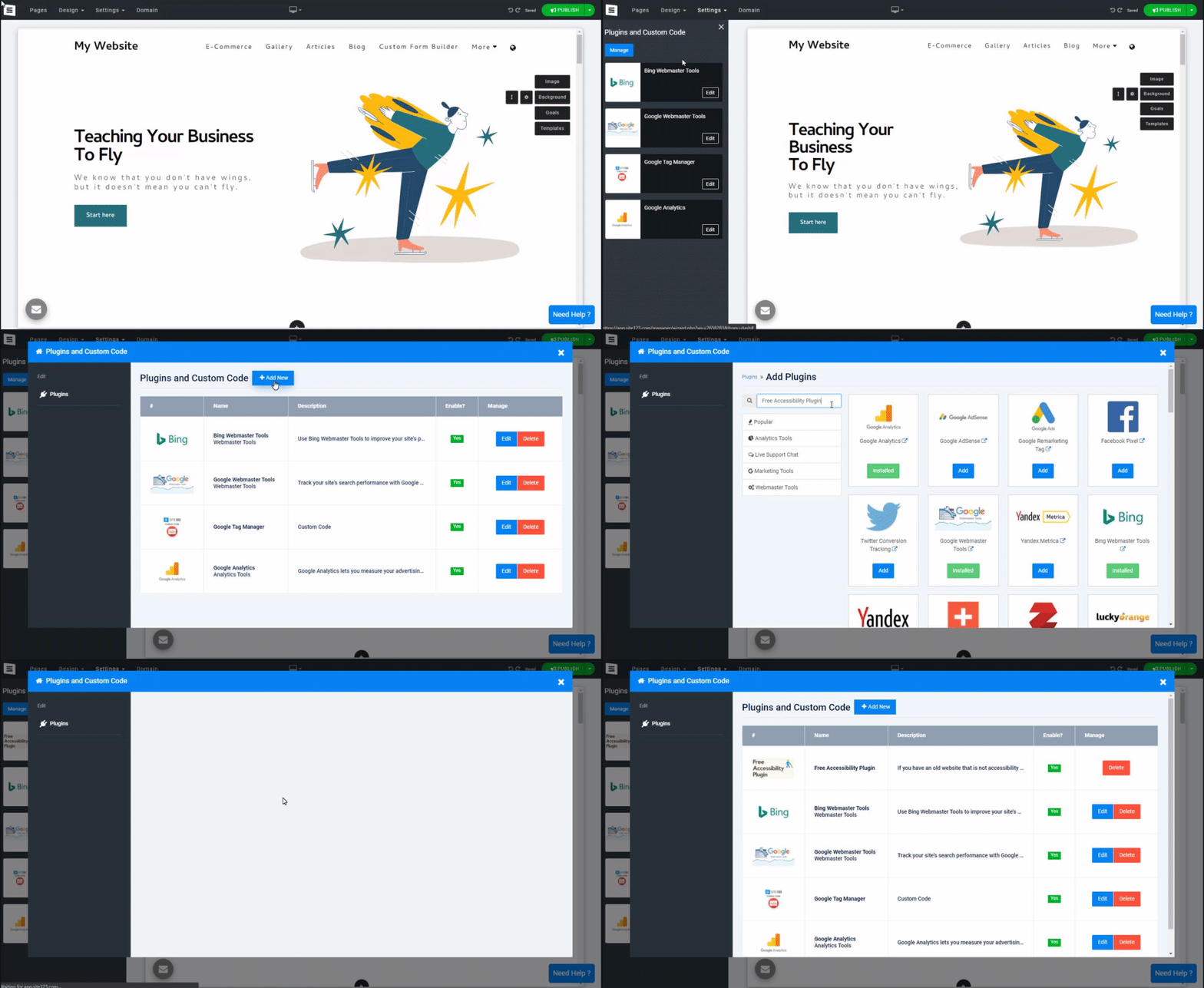
In your Website Editor, click the Settings (gear icon) and select Plugins.
Click the Add New button and select Add New Plugin.
Type Free Accessibility Plugin in the search bar.
Click the Add button next to the plugin.
The Accessibility tool is designed for instant use.
Once added, the plugin is automatically enabled.
No further configuration or "Application ID" is required.
To make the accessibility interface visible to your visitors, you must update your live site:
Click the Publish button in the top corner of your editor.
Tip: Once published, look for the accessibility icon (usually a small person icon) on your live website. Visitors can click this to adjust font sizes, color contrast, and other visual settings to suit their needs.